Checkout with Confidence
Payment Security Guaranteed
Return with Ease
Fast & Hassle-Free Process
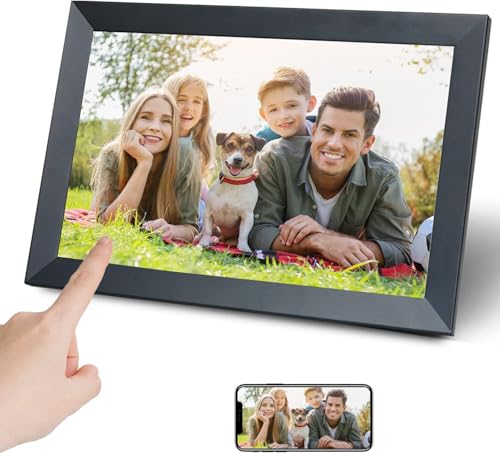
This product — KEDEEK Digital Photo Frame,10.1 inch WiFi Smart Digital Picture Frame IPS Touch Screen, auto-Rotate,Built-in 32GB Storage, Easy Setup to Share Photo and Video Via Frameo APP
Refer to the product listing for full specifications and care instructions. Check compatibility before purchase.
10.1" WiFi Digital Photo Frame with Touch Screen, 32GB Storage, Easy Setup via Frameo App
Key Takeaway
This 10.1-inch WiFi Smart Digital Photo Frame is the perfect way to showcase your cherished memories. With its vibrant IPS touch screen, built-in 32GB storage, and easy setup via the Frameo app, you can effortlessly share photos and videos with loved ones. Priced at just £59.99, it's an ideal gift for family and friends who want to keep their favorite moments alive in a stylish and interactive way.
Frequently Asked Questions
What is KEDEEK Digital Photo Frame?
The KEDEEK Digital Photo Frame is a 10.1 inch WiFi smart digital picture frame that allows users to display photos and videos. It features an IPS touch screen for easy navigation and an auto-rotate function for optimal viewing.
How much does KEDEEK Digital Photo Frame cost?
The KEDEEK Digital Photo Frame is priced at £59.99. This price offers great value for a frame with 32GB built-in storage and the ability to easily share photos via the Frameo app.
What are the key features of KEDEEK Digital Photo Frame?
Key features of the KEDEEK Digital Photo Frame include a 10.1 inch IPS touch screen, 32GB built-in storage, and the ability to share photos and videos through the Frameo app. Additionally, it has an auto-rotate function for versatile display options.
Who is KEDEEK Digital Photo Frame best for?
The KEDEEK Digital Photo Frame is ideal for families, grandparents, and anyone looking to showcase memories in a modern way. It is perfect for sharing photos and videos with loved ones, especially those who may not be tech-savvy.
How do I use/care for KEDEEK Digital Photo Frame?
To use the KEDEEK Digital Photo Frame, simply connect it to WiFi and download the Frameo app to start sharing photos. For care, keep the frame clean by wiping the screen with a soft cloth and avoid exposing it to direct sunlight.
Fast Delivery
Quick & reliable shipping
Secure Shopping
100% secure transactions
Great Prices
Competitive deals daily
Expert Support
Here to help you choose
More Products You Might Like from imageframes
View AllPlease Note: When you order through these links, we may earn a commission at no additional cost to you.